


PAGE CONTENTS
Access Point Names (APN): Effective Use in Enterprise and IoT

PAGE CONTENTS
What is an Access Point Name (APN)?
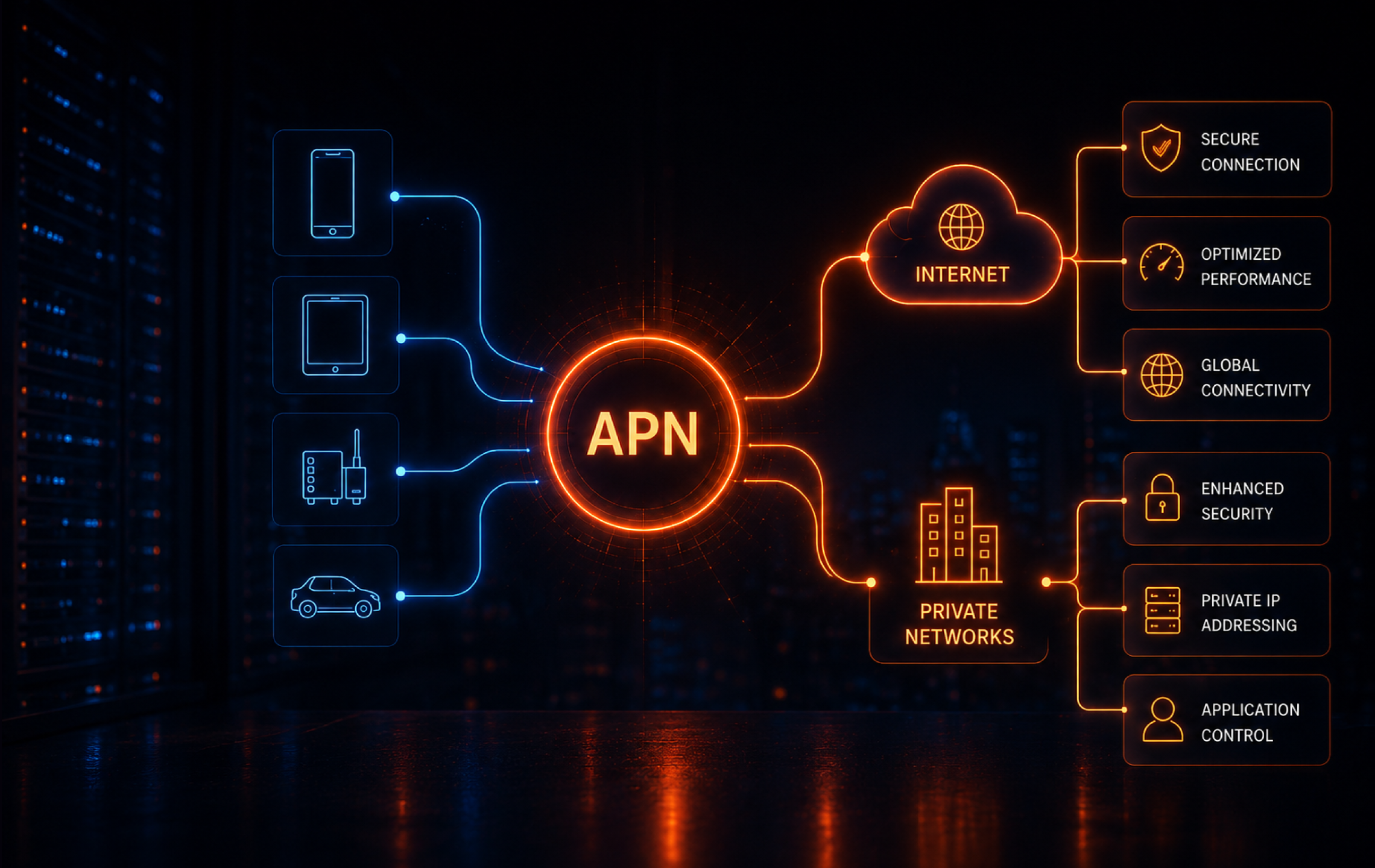
Access Point Names (APN) are configuration settings on mobile devices and IoT devices that define the network path for cellular data, connecting a device to the internet or private networks. They are crucial for ensuring proper connectivity, as they inform the carrier’s network of the correct IP address, security, and service type.
APN configurations are typically preloaded by carriers or provided to users for manual entry. Each carrier may use different APN settings depending on the type of service, customer segment, or device.
The APN not only determines internet access but can also specify routing to internal corporate networks, enable secure VPNs, or manage traffic for specific enterprise applications. This makes APN configuration essential for both consumer mobile devices and enterprise or IoT deployments that rely on cellular data.
This is part of a series of articles about cellular technologies
The Role of APNs in IoT and Enterprise Networks
APNs play a central role in IoT and enterprise deployments by enabling devices to connect to required resources. For IoT applications, the APN can route traffic directly to a private backend or cloud environment, bypassing the public internet and reducing exposure to threats. Enterprises use custom APNs to ensure devices such as sensors, vehicles, or POS terminals communicate only with authorized endpoints, enforcing network segmentation and data privacy.
In larger enterprise scenarios, APNs define network policies, manage device groups, and enable access to internal systems from remote or mobile endpoints. By isolating business-critical traffic from general internet traffic, enterprises can apply stricter security controls and comply with regulatory standards. Proper APN configuration also helps maintain application performance by prioritizing required traffic and reducing disruptions in critical operations.
Structure and Components of APN
Network Identifier
The network identifier is the core component of an APN, specifying the external data network a device should connect to. This part of the APN tells the carrier’s infrastructure whether the user is requesting access to the public internet, a corporate intranet, or a specific application network. The network identifier is usually the first segment of the APN string and determines how data traffic is routed.
A misconfigured network identifier can result in failed connections or routing to unintended networks, potentially exposing sensitive data or causing service outages. For IoT and enterprise solutions, the network identifier must align with the organization’s network design so devices are accessible only through approved channels.
Operator Identifier
In the full APN format defined by 3GPP, the operator identifier is the optional suffix that identifies the operator’s PLMN, commonly written as mnc<MNC>.mcc<MCC>.gprs. On many devices, users enter only the network identifier portion because the operator-specific suffix is derived by the network rather than typed manually .
Correctly setting the operator identifier prevents misrouting of data and supports compliance with carrier-specific policies or network restrictions. For global IoT deployments, where devices may move between regions or carriers, the operator identifier supports uninterrupted service and consistent policy enforcement.
Suffix / Data Standard Indicator (Optional)
Some APN names include extra labels to distinguish a service, private routing option, or operator-specific implementation. What those labels mean depends on the carrier. An APN does not usually declare the radio generation itself, so it is better not to describe these labels as LTE- or 5G-specific indicators.
In multi-service environments, the suffix can enable or restrict certain features, such as MMS, voice over LTE (VoLTE), or private networking. For organizations deploying a variety of device types or service profiles, using the suffix allows granular control without creating separate APNs. Incorrect use or omission can result in degraded service or loss of specialized features.
The presence of a suffix or data standard indicator also supports troubleshooting and diagnostics. Carriers and administrators can identify the intended service type or protocol more quickly, reducing time to resolve connectivity or performance issues.
Additional Configuration Settings
In addition to the APN string itself, most APN configurations include other parameters that influence how a device connects to the network and uses data services.
- Authentication type: Determines how the device verifies itself with the carrier’s network. Common options include PAP (Password Authentication Protocol), CHAP (Challenge Handshake Authentication Protocol), or none.
- Username and password: Required if authentication is enabled. These credentials are provided by the carrier or enterprise administrator.
- IP type: Controls whether the device receives a dynamic or static IP address and whether the address is IPv4, IPv6, or dual stack.
- Proxy and port: Optional fields for directing traffic through a proxy server.
- Bearer: Indicates the allowed types of radio access technologies, such as LTE, 5G, or NB-IoT.
Correct configuration of these parameters supports reliable service delivery and alignment with technical requirements. Misconfigured settings can result in failed connections or poor performance.
Example of APN Structure
Here is an example of an APN string:
iot.access.mnc001.mcc310.gprs
In this case:
- iot.access is the network identifier, designating the type of service.
- mnc001.mcc310 is the operator identifier, identifying the carrier (mobile network code 001 and mobile country code 310).
- gprs indicates the use of a data service domain, often used as a generic suffix in APNs.
A more complete configuration for a device might include:
- APN: enterprise.vpn.mncXXX.mccYYY.gprs
- Username: [carrier-provided, if required]
- Password: [carrier-provided, if required]
- Authentication type: CHAP
- IP type: IPv4
- Bearer: LTE
How APNs Work
When a mobile device attempts to use cellular data, it sends a request to the carrier’s network using the APN settings configured on the device. These settings guide the network on how to establish the data session and where to route the traffic.
The connection process typically follows these steps:
- Device initiates PDP context: Device requests a cellular data session: The device presents the configured APN or equivalent data network identifier when it asks the operator network to establish data connectivity .
- Operator core validates the request: The mobile core checks whether the subscriber is allowed to use the requested APN and then applies the relevant routing and policy rules for that session.
- IP address assignment: If approved, the carrier assigns an IP address to the device and defines the routing path.
- Traffic routing: The carrier routes data based on the APN configuration, such as to the public internet or a private enterprise network.
Session management and QoS: The network applies quality of service (QoS) rules, security filters, and usage policies defined for that APN
Types of APNs
Public APN
A public APN provides access to the general internet, allowing devices to communicate with external resources. This is the default configuration for most consumer mobile devices. Public APNs are managed by carriers and shared across many users.
Because devices share the same network path, there is greater exposure to external threats compared to private configurations.
Private APN
A private APN restricts access to a defined group of devices and connects them directly to a private network or VPN. This setup is common in enterprise and IoT deployments to enforce segmentation and control device connectivity. Private APNs can route traffic through firewalls and integrate with internal authentication systems.
By isolating traffic from the public internet, private APNs reduce exposure and support regulatory compliance requirements.
Virtual APN
A virtual APN (vAPN) uses the same physical infrastructure as a public or private APN but logically separates traffic based on the APN identifier configured on the device. This allows operators to offer differentiated services—such as bandwidth limits, content filtering, or routing rules—without deploying separate network hardware.
Virtual APNs are useful for managing multiple customer profiles or service tiers over a shared network. Each vAPN can apply unique policies, enabling fine-grained control over how traffic is handled while maintaining operational efficiency.
IoT and Enterprise Use Cases for APNs
APNs are widely used in IoT and enterprise environments to control how cellular devices connect to backend systems. By defining routing paths, IP addressing, and access policies, APNs allow organizations to isolate traffic, enforce segmentation, and integrate cellular endpoints with private networks, VPNs, or cloud platforms.
- Fleet and connected vehicles / telematics: Dedicated APNs route data from GPS units, onboard diagnostics, and telematics devices directly to fleet management platforms. This enables real-time tracking, remote diagnostics, traffic segmentation by vehicle or customer, and centralized data usage control.
- POS, ATMs, and payment terminals: Private APNs isolate payment devices from the public internet to support encrypted, segmented communication aligned with PCI DSS requirements. Static IPs and custom routing enable persistent connections to transaction processors and back-office systems.
- Industrial, SCADA, and critical infrastructure: APNs create private communication paths between remote sensors, controllers, and control systems without exposing traffic to the public network. Deployments often use static IPs, defined routing policies, and carrier-enforced QoS to prioritize operational data.
- Remote workforce routers and mobile edge: Cellular routers configured with enterprise APNs provide secure access to internal networks from field sites, vehicles, or temporary offices. APN and bearer settings define connectivity parameters for low-latency, high-bandwidth links to regional edge compute nodes.
EV charging, robotics, and smart city endpoints: APNs route traffic from distributed public devices through private cellular channels for remote management and software updates. Large deployments use APN-based segmentation, static IPs, or DNS routing to organize devices by region, type, or application.
Challenges Organizations Face with Access Point Name Management
Connectivity Issues From Incorrect APN Settings
Incorrect APN configurations can prevent a device from establishing a data session with the carrier network. A wrong network identifier, operator code, or authentication parameter may result in failure to access the internet or backend services.
In large-scale deployments, troubleshooting is more complex when devices are geographically dispersed or remotely managed. Consistent APN provisioning and validation processes help reduce downtime.
MMS / Service Failures
Many carriers use separate APN configurations for MMS, VoLTE, or other services. If these APNs are not configured correctly, features such as multimedia messaging or voice over LTE may fail.
In enterprise environments, failing to separate service-specific APNs from data APNs can cause routing conflicts or degraded performance.
Manual Configuration Complexity
Manual APN setup increases the risk of misconfiguration, especially when managing devices across multiple carriers or regions. Incorrect or outdated settings can lead to connection failures.
The complexity increases when devices require static IPs, specific authentication types, or bearer restrictions. Without centralized configuration tools or mobile device management (MDM) platforms, maintaining consistent APN settings becomes more difficult.
Security and Policy Limitations
APNs provide traffic segmentation but do not include built-in encryption or strong endpoint verification. Without additional security layers, such as VPN tunnels, certificate-based authentication, or private DNS, APNs alone do not ensure data confidentiality or integrity.
In shared or public APN environments, policy enforcement depends on carrier capabilities. Private APNs may also be limited by carrier-supported features.
Best Practices for Working With APNs
Use Private APNs for Security-Critical Deployments
Private APNs are often a strong fit when devices handle sensitive data or need controlled access to internal systems, but they should be paired with added controls such as TLS, VPNs, identity checks, or private DNS when the risk profile requires it. They restrict traffic to approved endpoints and allow routing through enterprise-controlled infrastructure such as firewalls or VPN gateways. This reduces exposure to the public internet and supports compliance requirements.
To strengthen security, combine private APNs with additional controls like IP whitelisting, private DNS, and encrypted tunnels. APNs define routing, but they do not encrypt traffic, so layered security is required for confidentiality and integrity. In regulated environments, integrating APNs with identity-aware access or certificate-based authentication further limits unauthorized device access.
Operationally, private APNs also provide better visibility. Traffic flows are more predictable, making it easier to monitor usage, detect anomalies, and enforce policies at scale.
Standardize and Automate APN Configuration
Define a consistent APN configuration template across devices, including naming conventions, authentication methods, and IP settings. This reduces variability and makes deployments easier to manage and troubleshoot.
Use mobile device management (MDM), eSIM profiles, or provisioning platforms to automate configuration at scale. Automation ensures devices receive correct settings during onboarding and updates, minimizing manual errors and reducing operational overhead. It also enables bulk changes when carriers update requirements or when migrating infrastructure.
Version control for APN configurations is often overlooked. Keeping a record of configuration changes helps trace issues, roll back misconfigurations, and maintain consistency across environments.
Align APN Design with Network Architecture
APN design should reflect how backend systems are structured. If services are hosted in cloud environments, APNs should route traffic through secure gateways or private connectivity options like MPLS or cloud interconnects.
Consider IP addressing, DNS resolution, and routing paths early in the design. Aligning APNs with the overall architecture avoids bottlenecks, simplifies integration, and ensures predictable data flows between devices and applications. Decisions such as using static vs dynamic IPs can impact how easily devices integrate with firewalls and backend services.
It is also important to account for latency and geographic distribution. Routing traffic inefficiently across regions can introduce delays, especially for real-time applications like telematics or industrial control systems.
Segment Traffic by Device Type or Function
Use separate APNs or logical segmentation to isolate different device groups, such as sensors, payment terminals, and employee devices. This allows applying distinct policies for each group, including QoS, bandwidth limits, and access controls.
Segmentation improves security and performance by preventing unnecessary communication between device classes. It also simplifies monitoring and troubleshooting, as traffic can be analyzed based on its intended function. For example, unusual traffic patterns in a payment APN can be flagged quickly without noise from unrelated devices.
As deployments grow, segmentation also supports scalability. New device categories can be introduced without affecting existing configurations, reducing the risk of service disruption.
Plan for Multi-Carrier and Roaming Scenarios
In deployments that span regions or require redundancy, design APN configurations that work across multiple carriers. This may include using global SIMs, carrier-agnostic APN formats, or fallback configurations.
Ensure that roaming agreements support required APN features, such as private routing or static IPs. Test behavior across networks to confirm consistent connectivity and policy enforcement, especially for devices that frequently change location. Differences in carrier implementations can affect authentication, IP assignment, or supported bearers.
It is also useful to plan for failover scenarios. Devices should be able to switch carriers or APNs without manual intervention, maintaining connectivity during outages or coverage gaps.
Large-Scale APN Management for IoT with floLIVE
FLOLIVE® helps teams manage APN policy as part of a larger IoT connectivity operation, not as a one-time device setting. Its cloud-native Connectivity Management Platform gives you one place to manage SIMs, usage, alerts, and custom APN configurations across distributed fleets.
That matters when your deployment spans multiple carriers or countries. Flolive combines custom APN (and Virtual APN) control with multi-IMSI connectivity, local breakout, and centralized visibility, so device traffic can stay closer to the application, meet local routing requirements, and stay easier to monitor at scale.
For teams running payment terminals, industrial equipment, vehicle fleets, or other field devices, APN design is only one part of the job. Flolive connects APN policy, profile management, and day-to-day operations in the same platform, which makes it easier to roll out changes, troubleshoot issues, and keep devices connected across markets.